
© Spanked Monkey Productions
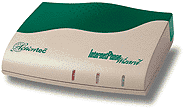
For those who don't already know, the Actiontec IPW (available in USB or PCI flavors) is a cool device which allows you to connect a regular phone to your PC, for the purpose of making telephone calls over the internet, very much like the Creative VOIP Blaster reviewed a short while ago.
As you can see from the review, the Creative VOIP was a bit of a dissapointment. Many people complained that they had no other choice for affordable VOIP, so they would just have to deal with all the problems of the VOIP Blaster. Well, competition is a beautiful thing folks. The Actiontec IPW is selling for about $65 retail for the PCI model, and $85 retail for the USB model ($37.69 and $52.79 respectively at buycomp.com). While this is a bit more expensive than the VOIP Blaster, I feel that both of these are at a reasonable price based on their quality as compared to the VOIP Blaster. Actiontec was nice enough to send us both models to test for free (though we have to give them back), and they were gracious and understanding when this review was several months late due to my untimely moving fiasco which is still not finished.
Support
I have never needed to contact Actiontec for support, however I would like to make a note that they do have driver updates for the IPW on their website. This would be rather unremarkable, if it were not for the fact that Creative has failed to offer any support for their VOIP Blaster; you cannot download updated drivers from their website, though the VOIP Dialer software is rather buggy. It has been well over a year since the VOIP Blaster has been released, and I am guessing that Creative does not have any plans to release driver updates. I applaud Actiontec for supporting their users who have spent their hard earned money on the IPW.
Since the InternetPhoneWizard does not use a proprietary service, you can use any number of free or for-pay PC-to-phone services. Unfortunately, I have not found any really good free or cheap services, they are all more laggy than I would like. Since the quality of the call in this situation is largely based on the service providor and not the VOIP device, the IPW and VOIP Blaster perform about equally here. Note however that PC-to-Phone with the VOIP Blaster is not free, and since the VOIP Blaster requires proprietary software, you cannot use it with services such as DialPad. As I have already mentioned previously, the InternetPhoneWizard does not have this limitation. I have found that the Innosphere service required in order to make PC-to-Phone calls with VOIP Blaster is not any better than Dialpad when it comes to lag or voice quality.
This is where the IPW really shines. Note that in order to use any VOIP service, you must have a reasonably fast connection with (this is the really important part) LOW LATENCY. If your connection has a lot of lag in it, your phone conversation WILL be choppy. There's nothing that Actiontec or Creative can do about that, it's just a limitation of the internet. If you have a quick connection, this can really be smooth. You can use NetMeeting to make a PC-to-PC call with an IPW device on both ends (though the person on the other end could theoretically simply use a microphone and speakers or a headset, I don't recommend it), and it will be almost impossible to tell the difference between this setup and a normal phone-to-phone call. And because you can use NetMeeting for PC-to-PC calls, if the person you are talking to has a webcam, you will be able to see them while you talk to them. This was a major limitation of the VOIP Blaster - it was incompatible with NetMeeting (you could not even have NetMeeting running while using the VOIP Blaster, it would interfere with your calls), so you could not see the person you were talking to, even if you did have a webcam.
The Actiontec IPW has another unique feature not found in the VOIP Blaster. You can hook the Actiontec IPW directly into your phone line, as well as to your computer, and your phone. This means that you can use the same phone for regular Phone-to-Phone calls, and for PC-to-Phone calls, so you won't have to buy another phone just to use for VOIP. This can save you some money, and helps to level the playing field when doing cost comparisons.
Product Comparison: IPW vs VOIP Blaster
Positive features are marked with BLUE, negative features are marked with RED, and neutral features are not marked with any color.
Feature | Actiontec IPW | Creative VOIP Blaster |
| Interfaces | USB & PCI | USB Only |
| Free PC-to-PC Calls | Yes | Yes* |
| PC-to-Phone Calls | Free or pay, 3rd party | Pay only, 3rd party |
| Compatible with NetMeeting** | Yes | No |
| Compatible with LAN & Firewall | Yes | No |
| Driver updates available | Yes | No |
| Adequate voice quality | Yes | Yes |
| Uses centralized database | No | Yes |
| Can place calls based on IP address | Yes | No |
| Requires dedicated phone for VOIP | No | Yes |
| Compatible Operating Systems | Win 98, ME & 2000 | Win 98, ME & 2000 |
| MSRP | $84.95 USB/$64.95 PCI | $19.99*** USB |
Should you buy a pair of IPW devices? Probably. Their higher price makes it hard to compete with the VOIP Blaster, but as you have clearly seen, the IPW is a much more fully developed device, offering much more flexibility. If you will be making frequent VOIP calls to a loved one far away, it is very easy to justify the price of the IPW, a pair of IPW devices will pay for themselves within a month or two just in the reduction of your phone bill. You will probably find, however, that it does more than just reduce your phone bill, it allows you to call more often. When my girlfriend and I were living in different states, we had been making $50 worth of phone calls a month, and wishing we could talk more; when we started using VOIP, we made what would have been several hundred dollars worth of calls, but they were free. If you will be using VOIP frequently, the features of the IPW will make it well worth it. However, if you just want to mess around with VOIP and see what it's all about, you may want to consider the VOIP Blaster, as a cheap alternative.
We give the Actiontec InternetPhoneWizard 4.5 out of 5 Staplers. - This device is highly recommended.
Places to Buy:
buycomp.com currently (9/18/2001) has the PCI Version for $38 ($37.69), and the USB Version for $53 ($52.79)
PCMall.com is selling the PCI Version for $73 ($72.99), and the USB Version for $90 ($89.99)
If you know of another reputable store selling the InternetPhoneWizard models for a reasonable price, let us know and we'll be happy to add it to the list.
Q & A
If you have a question about this product, feel free to ask us, and we will try to get an answer to you quickly, as well as post a response here.
© Spanked Monkey Productions