I know that a lot of people are wondering just how well this baby works, and whether or not it's worth the money. Let me just say that the answer to the latter question is: maybe. Read on to learn why.
The Creative VOIP is retailing for around $20 a piece, but if you are going to get one then you really ought to get two, so consider it a $40 expense. The reason why you must get two is that the person you are going to call really ought to have one of these too, because otherwise these calls will still cost you money, thus defeating the whole purpose of using VOIP instead of POTS (Plain Old Telephone System, no, I didn't make that up).
I ordered two of these little devices and had one sent to my girlfriend. Mine arrived first, and they come with some free PC-phone long distance time, so I decided to give it a try. I spent half of my free minutes continually calling and getting "dead air" before I learned one important factor: It does not work when Microsoft Netmeeting is running. You won't find that little tidbit of information anywhere on the creative VOIP site. Trust me, I looked. Once I did get it to let me make PC-phone calls, the quality was quite dissapointing. Lag was considerable, and there were many dropped packets of voice, conversations were just about unbearable.
So Leah (my wonderful GF) finally receives her VOIP Blaster a couple days later, and now we get to try this thing out for what it's really intended. After some minor USB-related configuration woes, we got the dialer software to allow her to call me, but it would not allow me to call her. We later discovered that it was because she had not filled out the email information in the settings, but this was a point of frustration for us for a long time until we discovered this.
So now that we've got it working properly, how do the calls sound? My school's internet connection is overburdened, and at times my download rates can be worse than a 14.4kbps modem. Needless to say, during those times, it is impossible to have a conversation with the VOIP Blaster. However, when the network is operating at decent speeds (even when it's still rather slow), the voice quality is VERY close to what you'd get talking long distance, only you're not paying for it. Despite all the problems we had with it, we have saved well over $40 in long distance charges by using it. In fact, we've been able to talk on the phone much more than we would have been able to afford otherwise.
Should you buy a set? Well, if you don't mind a few setup hassles (many of which may be avoided now that you have read my review), and if you have a good internet connection with relatively low latency, you'll love the VOIP Blaster. What sets this apart from services such as DialPad is that you can hook up a regular phone, and the sound quality is somewhat better. The ability to connect a regular phone means that you can use a cordless, which is absolutely essential if you live in a dorm room, with a roommate. Note however, that if you have a webcam you will not be able to use Netmeeting in conjunction with the VOIP Blaster. For my GF and I, this means that we can see eachother, or talk to eachother, but not both. It's a bit of a comprimise. If you have a lousy internet connection, then don't bother with this product. Also note that in true Creative fasion, support for this product is awful. There have been absolutely no software or driver updates, and I don't expect that there ever will be. Their online FAQ did not address a single issue I had with their dialer software, or the configuration of the VOIP Blaster.
We give the Creative VOIP Blaster 3.5 out of 5 Staplers. - It's a good product, but another company could probably do better. Where's the competition?
Update:
I was just recently made aware of a third party developer who has created drivers and software for the VOIP Blaster to replace the VOIP Dialer software (which is utter crap). I have not had a chance to test this software to see how well it works, but it could not possibly be any worse than what Creative is including with this device. Check it out, and please let us know what you think of the software.
Can you make a recording of the sound quality?
Unfortunately, I cannot make an accurate recording of the sound quality, because there is no way to capture the voice through the computer, and if I were to use a microphone, that would significantly reduce the quality, thus defeating the purpose.
Does the VOIP assign you a static IP that others can dial?
Not exactly, the VOIP assigns a "device ID", which others may dial to reach you. Your IP address is not used.
I heard that the Creative VOIP Blaster doesn't work behind a firewall or on a network, is this true?
Yes and no. If you are using a physical firewall, it will not work because the VOIP Dialer software uses your IP address to tell the server where the device ID is located. A physical firewall will assign your computer a non-routable IP address, so it will be impossible for the server to contact your device with that IP. If you have a firewall, you will have to place one computer outside of the firewall in order to use the VOIP Blaster. It's a similar situation with connection sharing, the VOIP Blaster must be hooked up to the computer which is connected to the internet and sharing its connection. However, if your internet connection is over a corporate or campus LAN, you should have a real IP address, which means that the VOIP Blaster will, in fact, work just fine over your network. My girlfriend and I are both connected to the internet through our school's LANs, and it works for us.
What communication standard does the Creative VOIP Blaster rely on?
According to creative, the VOIP Blaster is H.323 compliant. While one might think that this means it can communicate with other H.323 software, they would be wrong. In fact, it interferes with any other H.323 software that happens to be running while the dialer software is running, hence why it will not work with Netmeeting, which also uses H.323.
How does the voice quality compare to other voice over IP applications, such as dialpad or netmeeting?
It is my experience that the voice quality is much better. Creative says that this is because the VOIP Blaster uses an onboard DSP (Digital Signal Processor), but it could also be due to the fact that I tried dialpad and netmeeting using a cheap $20 headset.
What about the Actiontec VOIP device?
4/29/01 - UPDATE: Actiontec has agreed to send us two units for review. Expect these reviews to be up within a month.
Can I just type in the IP address of the other unit or do I have to register with innomedia to 'translate' for me?
The short answer: No, you can't just type in the ip address.
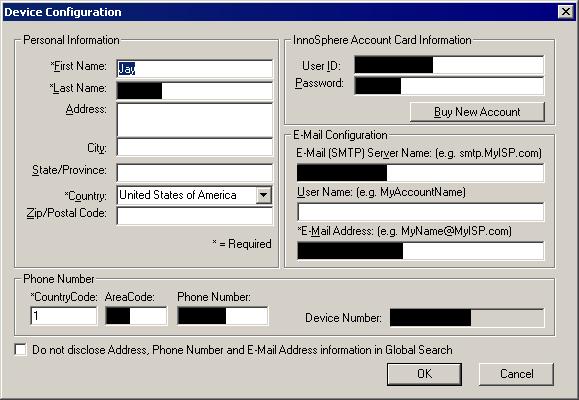
The long answer: You only have to register with Innomedia if you wish to take advantage of the $5 of free PC-to-Phone calls. Otherwise, all you have to fill out is the device configuration, which requires that you fill out the following fields: (screenshot - the black bars are to protect my privacy)
First Name
Last Name
Country
Country Code of your phone number
Email Address
There is a checkbox which allows you to make it so that other users cannot find your address (if you fill in that optional information), or your email address.
The device does function without an email address, but may not allow you to receive calls from other users (only make them). This is because the VOIP Dialer gives you the option of leaving a voice message for someone, but the message is actually emailed to them, hence if people can call you it must have your email address so that it can send voice messages to you.
Once you have given it your information, you VOIP Blaster will be assigned a device ID that will always be associated with it no matter what your IP address works. When you start the VOIP Dialer software, it connects to a server, and associates your VOIP Blaster Device ID with your current IP address so that other users may call you. This server also keeps a database of the information you give it (how much information depends on whether or not you check the box that was previously mentioned), so that other users may search for your device ID based on your name, email address, home address, etc..